

Most skill records don't expire on a clean annual cycle, but almost every HR system treats them like they do. Someone earns a certification, the system stamps a date, and twelve months later a reminder fires — whether the skill decayed in three months or is still sharp two years out. That mismatch is the root of most revalidation headaches. Either you're chasing people for refreshes they don't need, or you're trusting skills that quietly went stale months ago.
This post is a working rulebook for building a skill refresh lifecycle that decays skills at different rates, fires revalidation at the right moment, escalates cleanly when people ignore it, and handles the messy exceptions that always show up. It's meant to be copied and adapted, not admired.
Not all skills decay at the same speed
The first mistake teams make is applying one expiry window to everything. A forklift certification and knowledge of an internal deployment pipeline do not age the same way. Some skills fall off fast without practice; others stay durable for years even with no touch.
You need decay curves that reflect three things: how fast the skill degrades without use, how fast the underlying tool or regulation changes, and how much risk a stale version carries. A payment-processing compliance skill might carry high risk and change fast, so it decays aggressively. A general spreadsheet-modeling skill might barely move for two years.
Here's a starting taxonomy you can adapt. These aren't universal — they're a reasonable default that you tune against your own re-test data.
| Skill type | Typical decay window | Primary decay driver | Revalidation trigger |
|---|---|---|---|
| Regulatory / compliance | 6–12 months | Rule changes, audit risk | Fixed calendar + rule-change event |
| Tool / platform-specific | 9–18 months | Version and feature churn | Usage gap + major version bump |
| Safety / physical operations | 12 months | Muscle memory, risk exposure | Fixed calendar, non-negotiable |
| Analytical / conceptual | 18–36 months | Slow, mostly durable | Usage gap only |
| Client / domain knowledge | 12–24 months | Market and account shifts | Role change + light refresh |
The point isn't the exact numbers. It's that you stop treating a two-day safety cert and a durable analytical skill with the same 12-month rubber stamp. Teams that split skills into even three or four decay classes tend to cut their unnecessary revalidation volume noticeably — often by a third or more — because the durable skills stop generating noise.
One pattern worth flagging: usage-based decay beats calendar decay for anything tool-related. If someone has shipped code through a pipeline every week for the last quarter, forcing a revalidation because the calendar hit 12 months is theater. A better trigger is "no meaningful activity in X weeks and past the decay window." That combination is where the real signal lives.
Building the revalidation trigger logic
A trigger is more than a reminder date. A good one combines a time component, an activity component, and an event component, then decides whether to fire, defer, or skip.
Stop losing track of critical skills.
Talioly helps you track, develop, and certify your workforce efficiently.
- Centralized skill profiles
- Automated training reminders
- Competency gap analysis
No credit card required
FOR each skillrecord: decaywindow = decaycurve[skillrecord.type] dayssincevalidation = today - skillrecord.lastvalidated # base time check timeexpired = dayssincevalidation > decaywindow # activity check (only for usage-decaying skills) IF skillrecord.type in USAGEDECAYTYPES: recentactivity = artifactsinlast(decaywindow / 3) IF recentactivity AND dayssincevalidation < (decaywindow 1.5): defer(skillrecord, reason="activeuse") CONTINUE # event override (regulation or version change) IF eventflag(skillrecord.skillid): firerevalidation(skillrecord, priority="high", reason="event") CONTINUE # normal path IF timeexpired: firerevalidation(skillrecord, priority="normal") ELSE IF dayssincevalidation > (decaywindow 0.8): sendsoftwarning(skill_record) # early nudge
A few things to notice in that flow:
-
The soft warning at 80% of the decay window gives people runway before anything expires. Firing revalidation the day a skill goes stale guarantees a backlog of "expired" records nobody had a chance to address.
-
The activity deferral is what keeps active practitioners out of the queue. This depends entirely on having real artifact data feeding your skill profiles — if your evidence is self-reported, this logic is worthless. If your skills data is already drifting toward staleness, it's worth fixing the underlying record quality before layering triggers on top. The data-quality playbook on skills data rot covers staleness detection and confidence scoring that makes this kind of automation trustworthy.
-
The event flag is the piece most teams forget. When a regulation changes or a platform ships a breaking version, you don't wait for the calendar. You fire a targeted revalidation to everyone holding that skill, immediately.
Ensure artifact sources are reliable before enabling activity-based deferral.
Here's a quick visual of that trigger workflow.
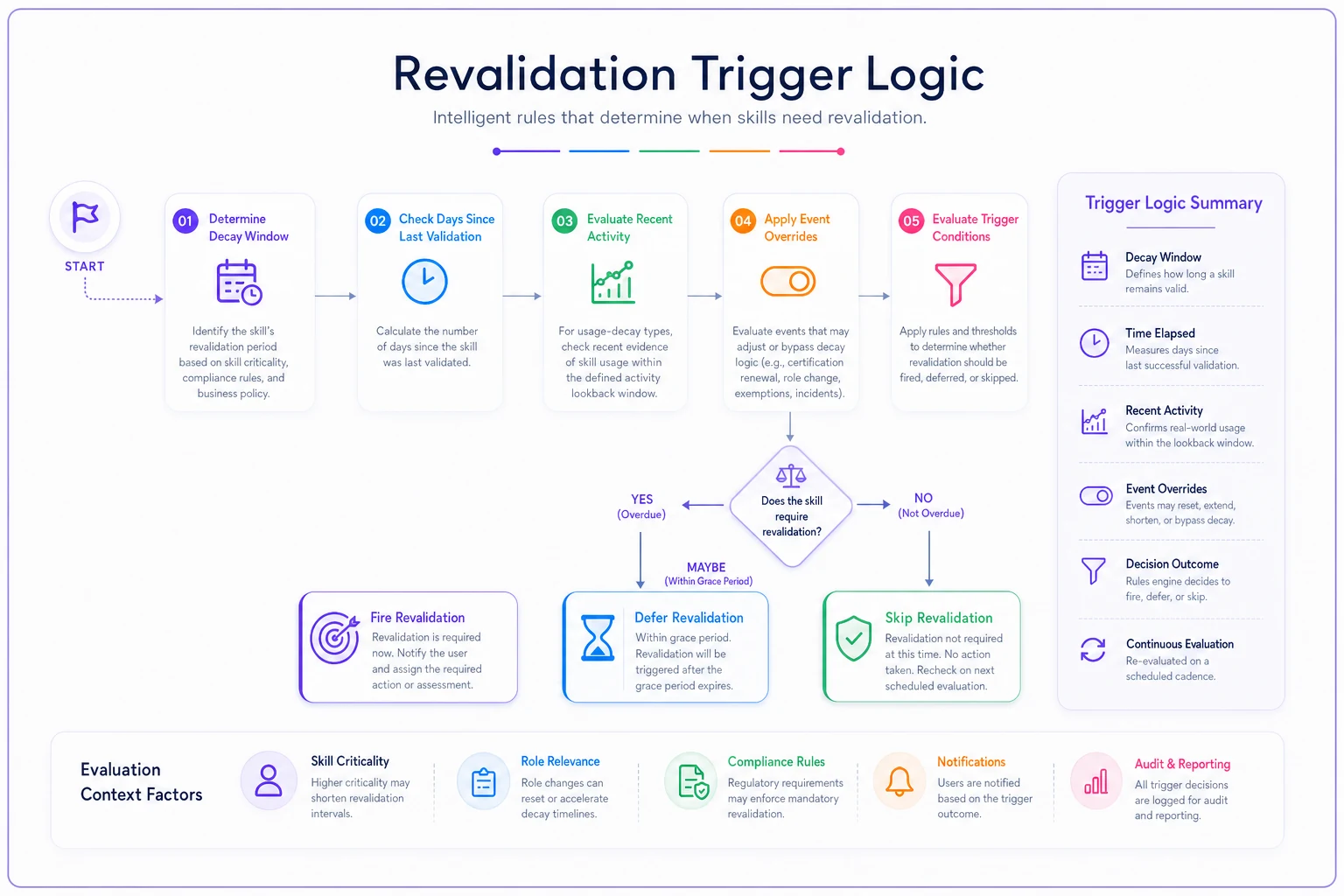
Use this diagram as a handoff to your automation owner.
Escalation SLAs: what happens when people ignore the trigger
This is where most revalidation programs quietly die. The trigger fires, the employee ignores it, and there's no defined path for what happens next. Six weeks later someone runs a report and finds 400 expired skills, half of them safety-critical.
You need an escalation ladder with defined timing and named owners at each rung. Here's a cadence table that works well for a mixed-risk skill portfolio:
| Stage | Trigger point | Action | Owner | SLA |
|---|---|---|---|---|
| Soft nudge | 80% of decay window | Automated reminder to employee | System | — |
| Revalidation open | Window expired | Task assigned, due date set | System | 14 days |
| First reminder | Day 7 unaddressed | Second automated nudge + manager cc | System | — |
| Manager escalation | Day 14 unaddressed | Task routed to direct manager | Manager | 7 days |
| Skill flagged stale | Day 21 unaddressed | Skill marked expired in profile | System | — |
| Access/duty review | Day 28 unaddressed | HRBP + manager review of role impact | HRBP | 5 days |
The critical design choice is when a skill actually flips to "expired" in the profile. Flip it the moment the window passes and your data looks alarming — people stop trusting it. Never flip it and you're carrying fiction. The 21-day point above — after nudges and one manager escalation — is a defensible middle ground for most non-safety skills. For safety and compliance skills, you flip on day one, no grace period. The whole point is that a lapsed safety cert should show as lapsed instantly.
FOR each openrevalidation: daysopen = today - revalidation.openeddate IF daysopen >= 7 AND NOT remindedonce: nudge(employee); cc(manager) IF daysopen >= 14 AND stillopen: routeto(manager); setsla(manager, days=7) IF daysopen >= 21 AND stillopen AND skill.risk != "safety": markexpired(skill) IF daysopen >= 28 AND stillopen: openreviewtask(hrbp, manager)
A note on manager SLAs: they only work if there's a visible consequence for missing them. An escalation that lands in a manager's inbox and sits there indefinitely is worse than no escalation — it trains everyone to ignore the system. If you're rolling this into a larger revalidation effort, the mechanics of manager QA and exception handling are worth setting up deliberately. The low-friction revalidation campaign guide walks through segmentation and the QA SLAs that keep escalations from becoming noise.
Exception rules: the cases that break your clean logic
Every revalidation program collides with reality within the first month. People are on leave. Someone's mid-role-transition. A contractor's skill is technically expired but they're rolling off next week. If you don't pre-define exceptions, managers start granting informal extensions over Slack and your audit trail falls apart.
-
Leave pause. If an employee is on parental, medical, or extended leave, revalidation timers pause and resume on return date plus a grace buffer (typically 14 days). Never let a skill expire against someone who was legally out.
-
Role transition hold. If someone is moving out of a role within 60 days, skills tied only to that departing role can be exempted — but the exemption expires with the transition, so it can't be used to permanently dodge revalidation.
-
Active-use override. Already handled in the trigger logic, but it deserves an explicit exception flag so managers can see why someone wasn't asked to revalidate.
-
Bulk event exemption. When you fire an event-driven revalidation to hundreds of people, you need a way to exempt those who were already validated after the event date. Otherwise you generate a flood of redundant tasks.
-
Manager one-time extension. Managers get exactly one 14-day extension per skill per cycle, logged with a required reason. One. If they need more than that, it escalates to HRBP review — which surfaces the real problem instead of hiding it.
The mistake worth naming here: teams that allow unlimited manager extensions think they're being flexible, but they're actually just moving the backlog off the dashboard into a shadow queue nobody tracks. A single logged extension with a hard cap keeps flexibility without destroying the data.
A short revalidation campaign playbook
When you're pushing a wave of revalidations — after a regulation change or an annual compliance cycle — running it as an ad-hoc email blast doesn't scale. Run it as a phased campaign with stop points.
-
Segment first. Split the population by skill risk, decay class, and current activity. High-risk expired skills go in wave one. Durable, actively-used skills might not need the campaign at all.
-
Baseline the queue. Count how many records are genuinely expired versus soon-to-expire. If the "expired" number is huge, your decay curves are probably too aggressive — fix the curves before you fire the campaign.
-
Stagger the sends. Don't fire all revalidations on day one. Releasing in waves of a few hundred keeps your assessment infrastructure and your SMEs from getting buried.
-
Watch the completion rate at day 7. If less than half the first wave has engaged, pause and check whether the assessment itself is too heavy. Low completion is usually a friction problem, not a motivation problem.
-
Route stragglers into the standard escalation ladder. The campaign doesn't get its own special escalation — it feeds the same SLA machine you already built. One escalation path, not two.
A quick real-world example
A regional healthcare operations group had roughly 1,900 employees carrying a mix of clinical safety certs, compliance training, and internal-system skills. Everything ran on a flat 12-month expiry. Their problem: about 600 revalidation tasks fired every quarter, managers ignored most of them, and an internal audit found that around 15% of "current" safety skills had actually lapsed — because expired records were sitting in an untouched queue.
They split skills into four decay classes, added usage-based deferral for the internal-system skills, and set a hard day-one expiry with no grace for safety certs. Quarterly revalidation volume dropped to somewhere around 350–380 tasks because the durable and actively-used skills stopped generating noise. The safety-cert lapse rate fell close to zero within two cycles, since those now escalated immediately instead of hiding in a backlog. The manager escalation SLA — with a single logged extension cap — meant the remaining tasks actually got handled instead of drifting.
The interesting part wasn't the automation itself. Reducing the volume of unnecessary revalidations made people take the remaining ones seriously. When everything is flagged, nothing gets attention.
When this is worth building — and when it isn't
This kind of lifecycle automation pays off when you have a real mix of skill types with genuinely different decay rates, and enough people that manual tracking has already broken down. If you're managing a few hundred skill records across a handful of skill types, a well-maintained spreadsheet with calendar reminders might be all you need.
It's also a bad idea to build this on top of unreliable evidence. If your skill profiles are fed by self-assessment and stale training logs, sophisticated decay curves and activity-based deferral will just automate wrong decisions faster. Get the underlying data trustworthy first, then layer the lifecycle logic on top.
And it genuinely doesn't work for teams that won't enforce manager SLAs. The entire escalation ladder depends on someone caring when a stage is missed. If managers face no consequence for ignoring escalations, you'll build a beautiful rules engine that everyone quietly routes around within a quarter.
The goal of a skill refresh lifecycle isn't to fire more reminders — it's to fire the right ones, at the right moment, with a clear, logged path for what happens when they're ignored. Differentiated decay curves keep your durable skills quiet. Usage-based deferral keeps active people out of the queue. A defined escalation ladder with capped exceptions keeps the whole thing honest. Copy the tables, adapt the pseudo-code to your own decay data, and tune the windows against your actual re-test results rather than a default someone guessed at years ago. That's the difference between a revalidation program people trust and one they learn to ignore.
Ready to elevate your team's skills?
Join 500+ companies using Talioly to boost skill visibility, streamline training, and drive performance growth.